
If Tojuri disappears, your files don't.
Your Recovery Kit and your own Amazon sign-in. Nothing else.
Bring back yesterday.
A file was deleted today. Slide back a night and it is still there.
Sample files only. Nothing real is read, downloaded or changed. Real recovery can take time and has provider fees, shown before you confirm.

Nana hands Pip the envelope. It goes in the album box, with the oldest photographs.
Nana keeps the key.

One sheet: your Recovery Code and where your files live.
Anyone with it and your Amazon sign-in may be able to recover. That is why it is paper.
Tojuri cannot see the code and cannot replace it. Nana keeps hers with the oldest photographs.
Three things. That is the whole list.
Getting your Tojuri sign-in back does not replace a lost Recovery Kit. Apart from the Mac that made your backup, the Kit is the only way in, and Tojuri cannot rebuild it.
Getting your files back on your own.
The recovery tool is one small file you can read before you run it. It needs no Tojuri account.
- Make an Amazon access key.
Sign in to Amazon Web Services with the email on your Kit. Open Security credentials, then Create access key.
- Download the recovery tool.
Download recover.sh and save it to your Downloads folder.
To check it is ours, type
shasum -a 256 ~/Downloads/recover.shin Terminal. It must print1e1500779213a7de9bd8a0f76f8fa22576580d859ce96daa692d440d46b863e1 - Open Terminal and run it.
Type
bash ~/Downloads/recover.sh - Answer its questions from your Kit.
Storage location, region, folder, your access key, and your Recovery Code as printed. A typo is caught before anything starts.
- Wait.
It fetches restic from its official page, checks it, then copies your files to the folder you chose. Keep the Mac plugged in and online.
Contents, names, modification dates, permissions and tags.
Creation dates, sharing rules added in Get Info, and hidden status.
Older files take a night.
Files backed up in the last 90 days come back straight away. Older ones rest in Amazon's lowest-cost archive and are woken up first: ready within 12 hours, or within 48 hours for less.
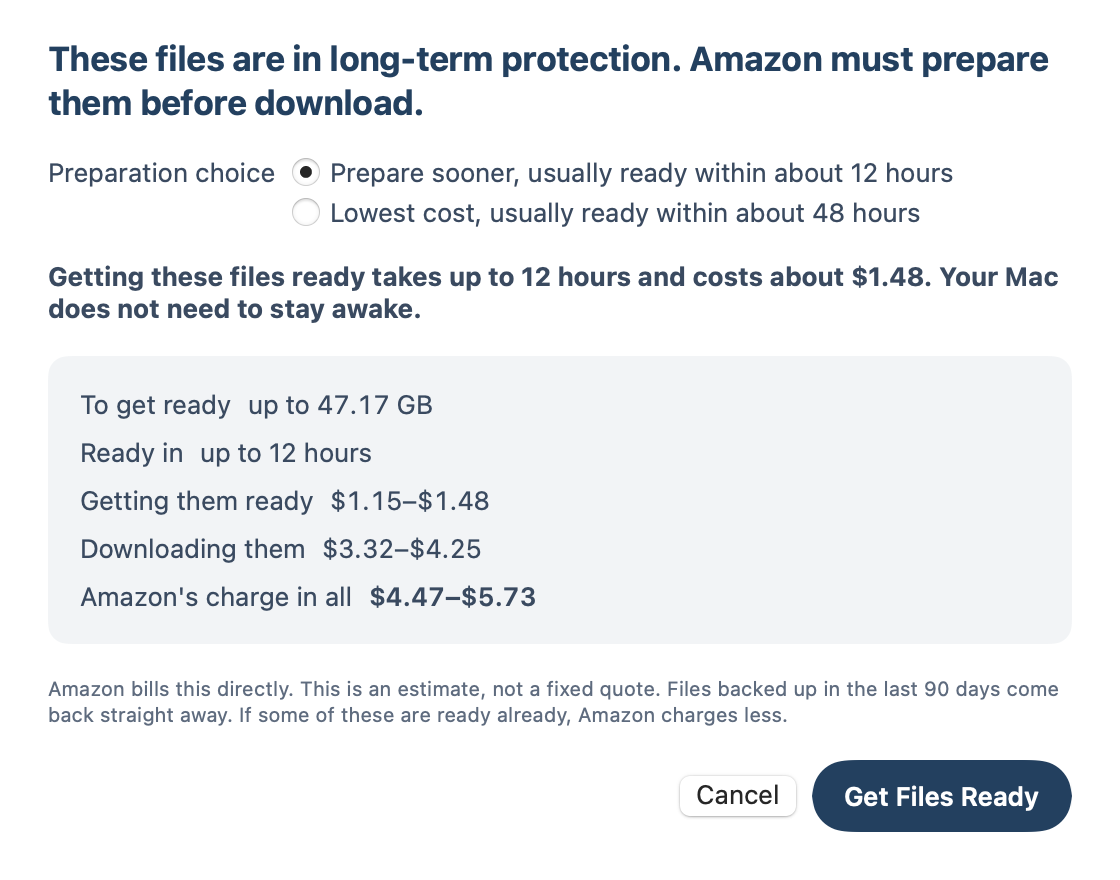
You see the wait and the cost before anything is charged, and you choose. Your Mac does not need to stay awake.

Real app. Sample data and an estimate, not a fixed quote. Amazon bills this directly.
Proved, not just promised.

With only a plain Amazon sign-in and one printed Recovery Code, we recovered a real backup end to end. Every file matched the original, byte for byte. No Tojuri login. No help from Tojuri.
The honest scope: that test ran on a small backup. A full-scale rehearsal is still to come, and we will say so here when it is done.
$99 to $134 per TB
Getting everything back costs Amazon's own fees, mostly the download. A few files cost pennies.
Helping someone else? You need this page, their Recovery Kit, their Amazon sign-in, and a Mac.